A 1 App Builders
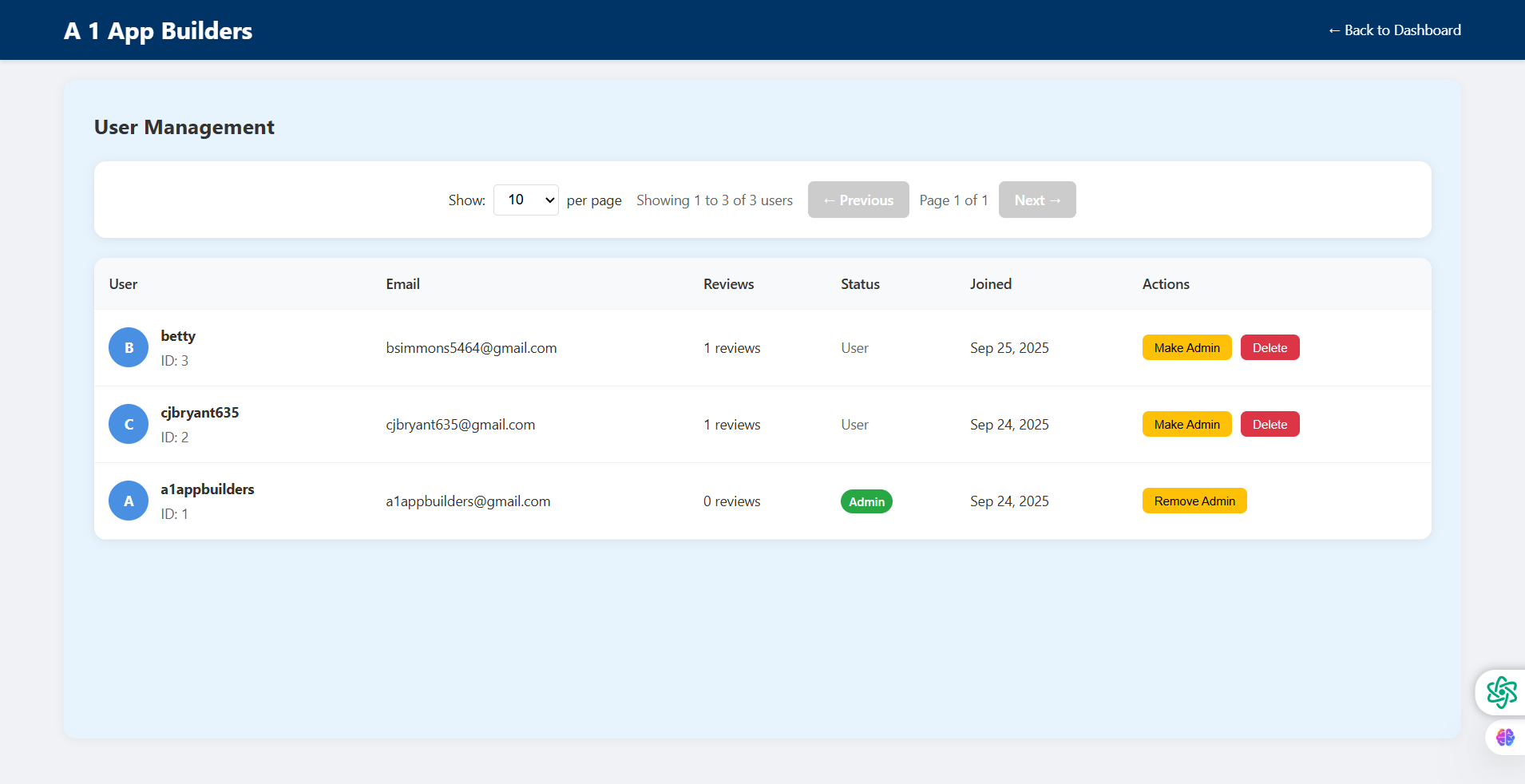
Navigate the A1 App Builders User Management Dashboard—a comprehensive administrative interface for viewing, editing, and controlling user accounts across the platform. This powerful management system displays user profiles, email addresses, review counts, account statuses, join dates, and role-based action buttons enabling administrators to promote users, remove administrators, and delete accounts while maintaining platform security and organization.
The layout prioritizes user administration through a clean tabular design featuring circular avatar initials, paginated results, filtering controls, and color-coded action buttons (yellow for promotion, red for deletion) that streamline account management and role assignment workflows.
🌟 Key Features:
- Top Navigation Bar: Dark blue header containing:
- "A 1 App Builders" logo in white text on left
- "← Back to Dashboard" link on right
- Consistent admin interface branding
- Quick navigation return pathway
- Page Title: "User Management" heading establishing section purpose
- Pagination Controls Bar: Top control panel featuring:
- "Show: 10 per page" dropdown selector
- "Showing 1 to 3 of 3 users" count display
- "← Previous" button (grayed out/disabled)
- "Page 1 of 1" current page indicator
- "Next →" button (grayed out/disabled)
- Scalable result management interface
- Data Table Structure: Six-column layout displaying:
- User | Email | Reviews | Status | Joined | Actions
- Clean typography and generous spacing
- Light background with white row cards
- First User Entry (betty): Regular user card showing:
- Blue circular avatar with "B" initial
- Username: "betty" with "ID: 3" subtitle
- Email: bsimmons5464@gmail.com
- Reviews: "1 reviews"
- Status: "User" in plain text
- Joined: "Sep 25, 2025"
- Actions: Yellow "Make Admin" button, Red "Delete" button
- Second User Entry (cjbryant635): Regular user card displaying:
- Blue circular avatar with "C" initial
- Username: "cjbryant635" with "ID: 2" subtitle
- Email: cjbryant635@gmail.com
- Reviews: "1 reviews"
- Status: "User" designation
- Joined: "Sep 24, 2025"
- Actions: Yellow "Make Admin" button, Red "Delete" button
- Third User Entry (a1appbuilders): Administrator account showing:
- Blue circular avatar with "A" initial
- Username: "a1appbuilders" with "ID: 1" subtitle
- Email: a1appbuilders@gmail.com
- Reviews: "0 reviews"
- Status: Green "Admin" badge (distinct from regular users)
- Joined: "Sep 24, 2025"
- Actions: Yellow "Remove Admin" button (no delete button)
- Floating Utility Icons: Bottom-right corner utilities:
- Green settings/configuration icon
- Purple/pink brain/AI icon
- Consistent across admin interface
💡 Why It Works
This user management interface maximizes administrative control through intelligent role-based actions and clear visual hierarchy. The circular avatar initials (B, C, A) provide instant user identification while maintaining visual consistency. The ID numbers enable precise user referencing in support contexts. The review count column helps administrators identify active vs. inactive community members. The green "Admin" badge on a1appbuilders creates immediate role visibility distinct from plain "User" text. The yellow "Make Admin"/"Remove Admin" buttons use warm colors for promotion actions, while red "Delete" buttons signal destructive operations. Notably, the admin account (a1appbuilders) shows only "Remove Admin" without a delete option—a critical safety feature preventing accidental account deletion. The pagination controls prepare the interface for scale, even though currently showing all 3 users on one page. The "Showing 1 to 3 of 3 users" counter provides transparency about total account population. The chronological join dates (Sep 24-25, 2025) enable tenure tracking. This interface transforms user administration from complex task to streamlined workflow, empowering administrators to manage roles and accounts while maintaining platform security through role-appropriate action visibility.
Policy:
All upgrades are free.
This is a try-before-you-buy product; no refunds are issued after purchase.