A 1 App Builders
Main Screen Features
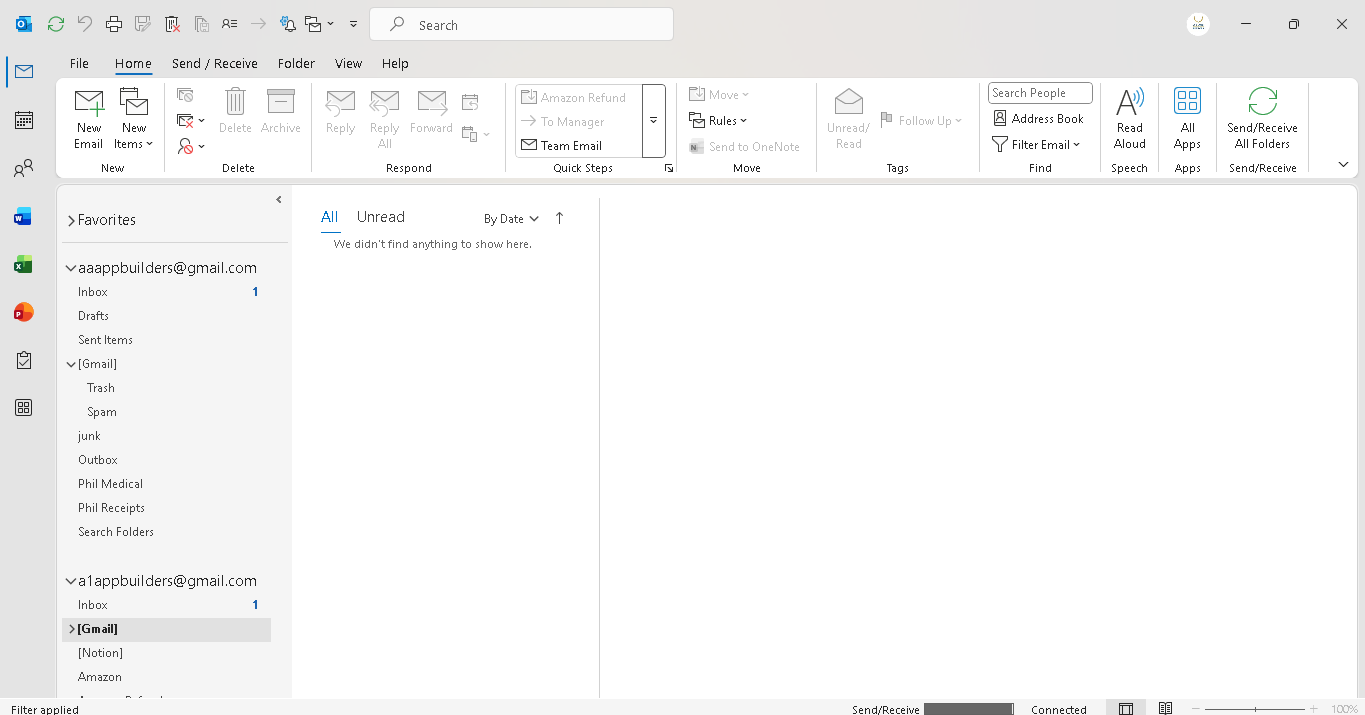
Welcome to the Email Client Integration View—a comprehensive email management interface. This screen displays inbox organization, email folders, message lists, and detailed email content viewing capabilities for managing communication across multiple accounts and categories.
The email client interface is feature-rich, organized, and designed for efficient email management, giving users complete control over their inbox with advanced organization, filtering, and communication tools.
🌟 Key Features:
- Top Toolbar: Comprehensive action bar with:
- New Email, New Items options for creating communications
- Reply, Reply All, Forward, and Respond options for email interaction
- Delete and Archive buttons for message management
- Move and Rules options for organization
- Amazon Refund and To Manager quick action buttons
- Team Email and Quick Steps for workflow automation
- Unread/Read and Follow Up controls for prioritization
- Address Book, Filter Email, and Find options for contact and message search
- Left Sidebar Navigation: Organized folder structure including:
- Favorites section for quick access to important folders
- Email account selector (a1appbuilders@gmail.com)
- Standard folders: Inbox, Drafts, Sent Mail, Trash, Important, Spam
- Custom folders: Amazon, Amazon Refund, Bank, Check Out, Louis Medical, One.com, Outbox
- Empty State Display: When no messages match the current filter, the interface displays:
- Message text: "We didn't find anything to show here."
- Indicates the selected folder or filter has no matching emails
- Multi-Account Organization: Dual email account display showing:
- aaappbuilders@gmail.com account with Inbox (1 unread), Drafts, Sent Items
- a1appbuilders@gmail.com account with Inbox (1 unread) and Gmail folders
- Custom folders for Phil Medical, Phil Receipts, and Search Folders
- Email Content Viewer: Right panel showing:
- Full email message content with sender information
- Subject line and timestamp display
- Message body with formatting and links
- Reply/Forward navigation buttons
- Information banners for message status and actions
- Status Bar: Bottom bar showing connection status, error indicators, and zoom controls.
- Professional Design: Multi-pane layout with gray/white color scheme, organized toolbars, intuitive folder hierarchy, and clean message display for efficient email management.
💡 Why It Works
This email client interface delivers powerful communication management. Organized sidebar folders enable quick navigation, comprehensive toolbar actions streamline common tasks, the message list provides overview scanning, and the detailed content viewer allows full message review—all integrated into one cohesive interface for managing multiple email accounts and maintaining organized communication workflows.
Policy:
All upgrades are free.
This is a try-before-you-buy product; no refunds are issued after purchase.