A 1 App Builders
Main Screen Features
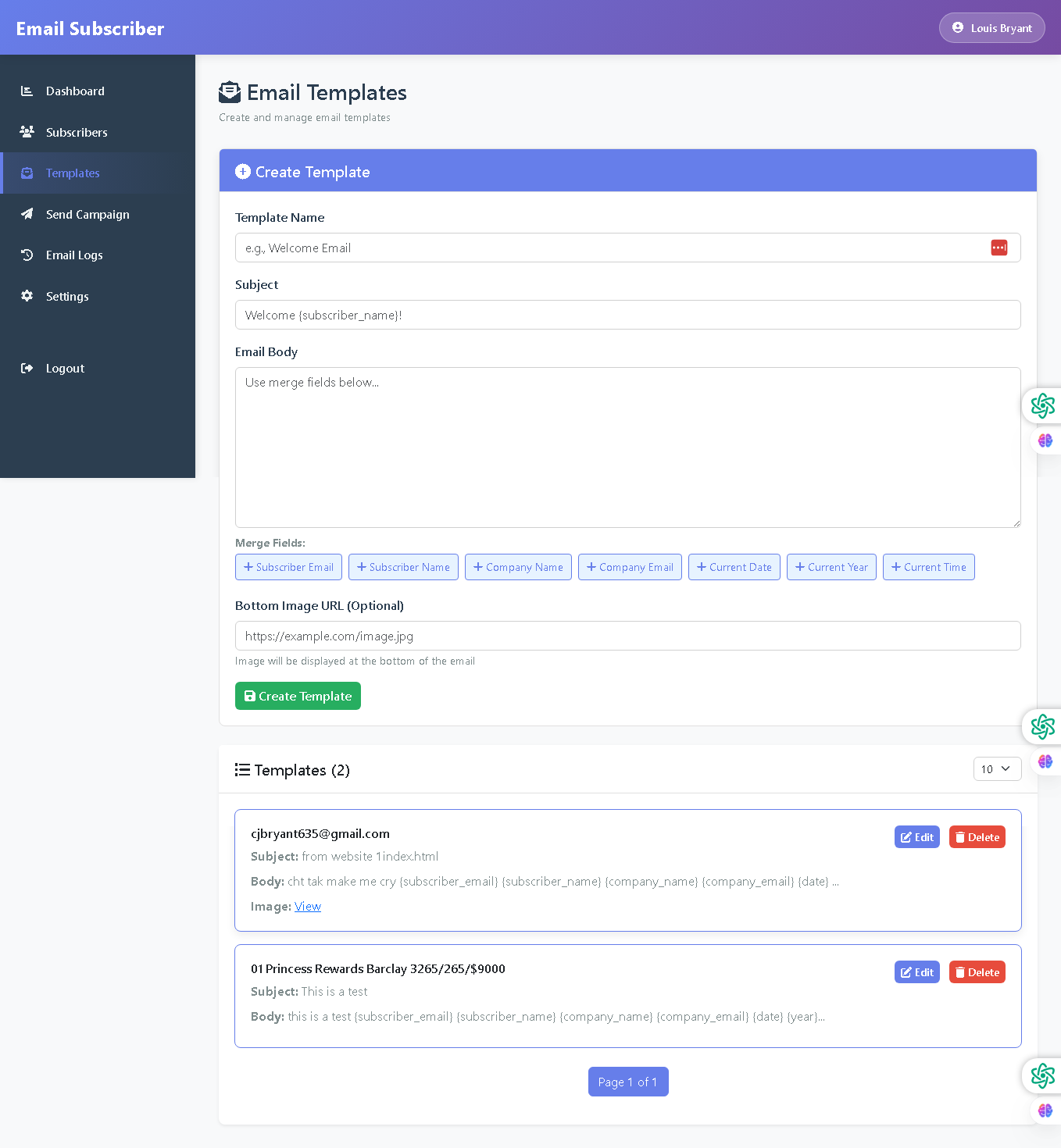
Welcome to the Email Templates Management Page—your creative hub for designing and managing reusable email templates. This interface provides comprehensive template creation tools with dynamic merge fields, advanced customization options, and a complete template library for quick access and management.
The templates page is intuitive, feature-rich, and designed for efficient email campaign creation, giving administrators powerful tools to create professional, personalized emails at scale.
🌟 Key Features:
- Create Template Section: Purple header bar with "Create Template" title and section containing:
- Template Name field with placeholder "e.g., Welcome Email" and red clear button
- Subject field with merge field example "Welcome [subscriber_name]!"
- Email Body textarea with placeholder text and merge field instructions
- Merge Fields toolbar with quick-add buttons:
- Subscriber Email
- Subscriber Name
- Company Name
- Company Email
- Current Date
- Current Year
- Current Time
- Bottom Image URL field (optional) with helper text explaining image placement
- Green "Create Template" button with disk icon
- Templates Library: Section displaying all created templates (2) with:
- Template cards showing:
- Template name/identifier
- Subject line preview
- Email body preview with merge field syntax visible
- Image link with "View" option
- Blue "Edit" button - modify template
- Red "Delete" button - remove template
- Template cards showing:
- Pagination Controls: Items per page dropdown showing "10" and blue pagination indicator (Page 1 of 1).
- Professional Layout: Clean white content area with purple header, organized form sections, and color-coded action buttons for intuitive template management.
💡 Why It Works
This templates page empowers administrators to create consistent, professional emails with minimal effort. Smart merge field buttons enable personalization without syntax errors, the template library allows quick reuse across campaigns, and inline edit/delete options provide complete management control—all in one streamlined interface.
Policy:
All upgrades are free.
This is a try-before-you-buy product; no refunds are issued after purchase.