A1 App Builders
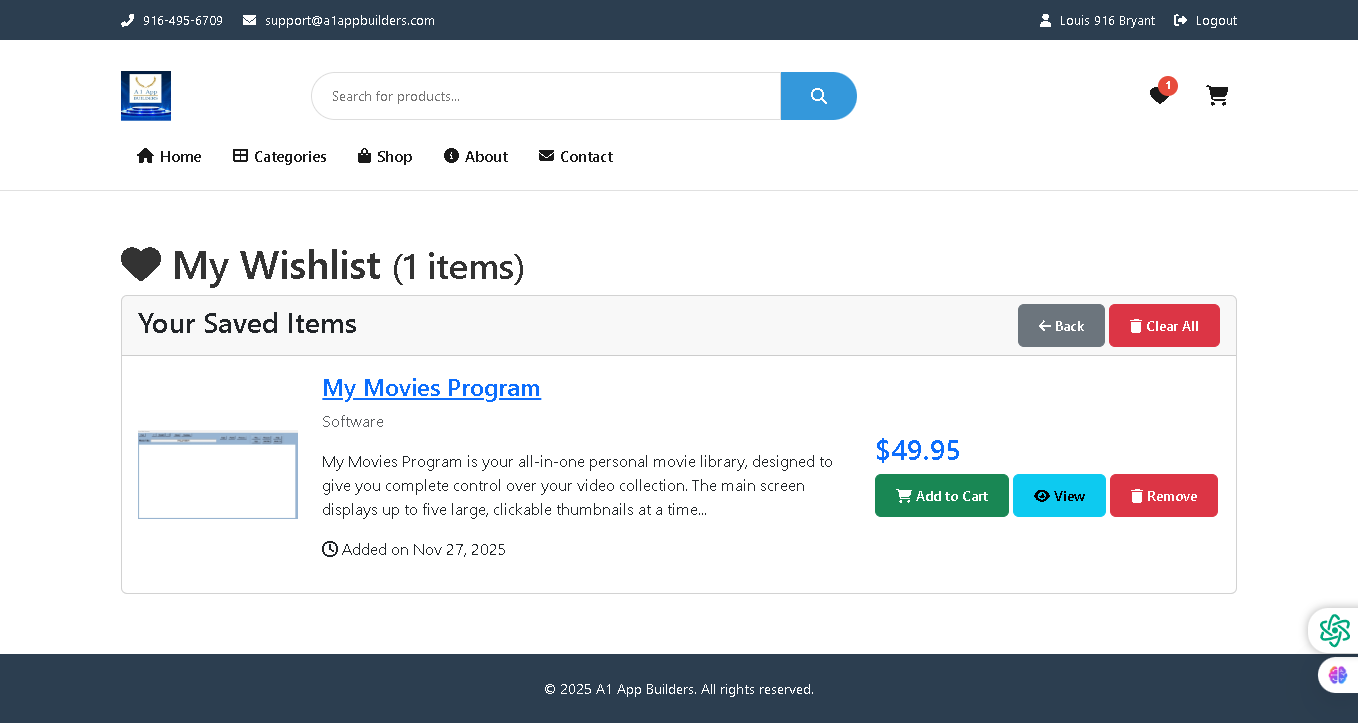
Welcome to the A1 App Builders Wishlist Page—a personalized collection interface where customers save and manage products they intend to purchase in the future. This page enables users to maintain a curated list of desired items, making it easy to track interests, compare products, and convert saved items into purchases.
The layout features a heart-icon header, saved items display with detailed product information, pricing, and quick-action buttons that streamline the path from wishlist to purchase or removal.
🌟 Key Features:
- Header Navigation: Top bar includes:
- Contact information: Phone (916-495-6709) and email (support@a1appbuilders.com)
- A1 App Builders logo
- Search bar with blue search button
- Primary menu: Home, Categories, Shop, About, Contact
- Wishlist icon with red badge showing "1" item
- Shopping cart icon
- User profile "Louis 916 Bryant" with logout option
- Page Header: Large heading with heart icon displaying "My Wishlist (1 items)" clearly indicating the page purpose and current wishlist count.
- Wishlist Management Section: A white container titled "Your Saved Items" with two control buttons:
- Back Button: Gray button with back arrow for navigation to previous page
- Clear All Button: Red button with trash icon to remove all wishlist items at once
- Wishlist Item Card: A comprehensive product display showing:
- Product Image: Thumbnail screenshot of the desktop application interface
- Product Title: "My Movies Program" displayed as a blue hyperlink for product detail access
- Category Label: "Software" designation indicating product type
- Product Description: Detailed summary explaining the software's purpose: "My Movies Program is your all-in-one personal movie library, designed to give you complete control over your video collection. The main screen displays up to five large, clickable thumbnails at a time..."
- Timestamp: "Added on Nov 27, 2025" with calendar icon showing when item was saved
- Product Pricing: Bold blue price display showing "$49.95" prominently positioned on the right side of the item card.
- Action Buttons: Three contextual buttons allowing quick product interactions:
- Add to Cart: Green button with shopping cart icon for immediate purchase
- View: Cyan/turquoise button with eye icon for detailed product review
- Remove: Red button with trash icon to delete from wishlist
- Wishlist Badge: Red notification badge on the wishlist icon showing "1" indicates active saved items without requiring page navigation.
- Empty State Handling: Clear indicator "(1 items)" in header manages user expectations and provides feedback on collection size.
- Footer: Simple dark footer with copyright notice "© 2025 A1 App Builders. All rights reserved." maintaining brand consistency.
- Visual Design: Clean white background, heart icon branding, color-coded buttons (green for add, cyan for view, red for remove), and clear typography guide user interactions.
💡 Why It Works
This wishlist page reduces purchase friction by allowing customers to save items for future consideration without immediate checkout pressure. The heart icon and "(1 items)" counter create emotional connection and visibility into saved products. The detailed product description and timestamp provide context for saved items, helping users remember why they added products. The three-button action set (Add to Cart, View, Remove) accommodates different user intents—impulse purchasing, deeper research, or list refinement. The "Clear All" button prevents cluttering without requiring individual item deletion. The red badge on the wishlist icon provides persistent visibility of saved items across the site. The color-coded buttons use established conventions (green=positive action, red=deletion) to guide user behavior intuitively. This combination of features transforms the wishlist from a simple storage mechanism into an active marketing tool that bridges browsing and purchase conversion.
Policy:
All upgrades are free.
This is a try-before-you-buy product; no refunds are issued after purchase.