A 1 App Builders
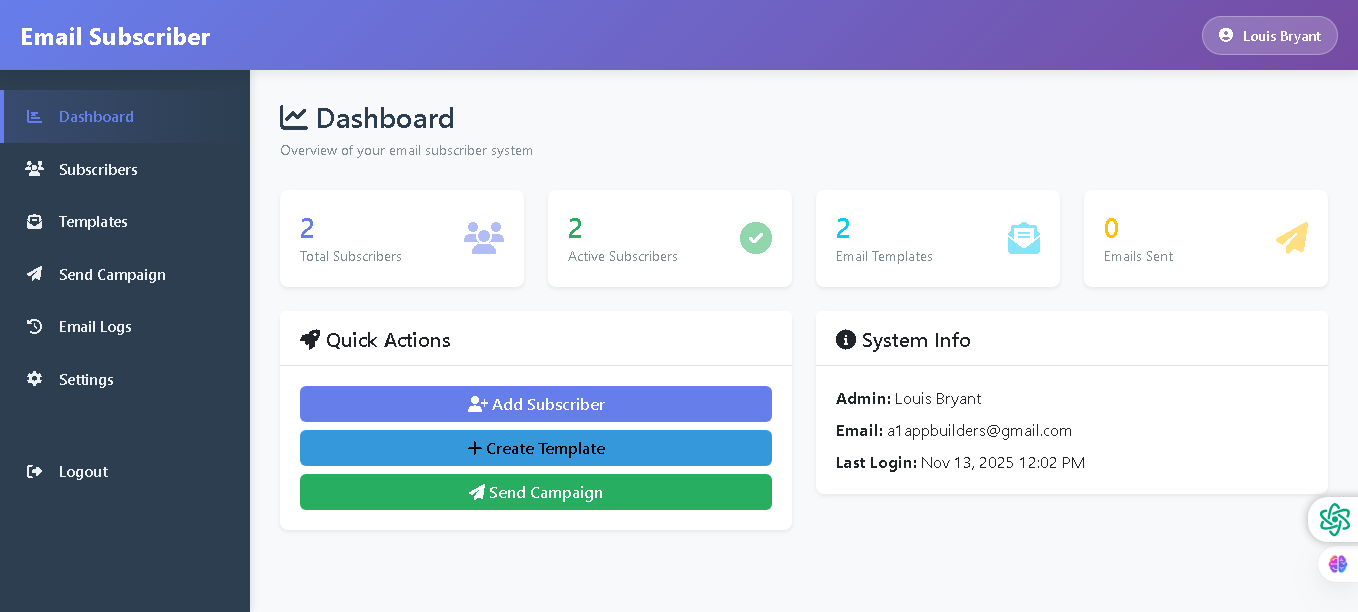
Main Screen Features
Welcome to the Email Subscriber Dashboard—your central command center for managing email campaigns and subscribers. This dashboard provides a comprehensive overview of your email system performance and quick access to essential management tools.
The dashboard is organized, intuitive, and designed for at-a-glance insights, giving administrators all the critical information they need in one professional interface.
🌟 Key Features:
- Header Navigation: Purple header bar displays the "Email Subscriber" branding prominently with a user profile section (Louis Bryant) in the top right for quick account access.
- Sidebar Menu: Dark navigation panel on the left with clearly labeled sections:
- Dashboard (currently active)
- Subscribers
- Templates
- Send Campaign
- Email Logs
- Settings
- Logout
- Statistics Overview: Four key metric cards displayed at the top showing:
- Total Subscribers (2)
- Active Subscribers (2)
- Email Templates (2)
- Emails Sent (0)
- Quick Actions Section: Three prominent action buttons for immediate tasks:
- Add Subscriber (purple)
- Create Template (blue)
- Send Campaign (green)
- System Info Panel: Right-side panel displays critical account information:
- Admin name and email
- Last login timestamp
- Professional Design: Clean white content area with purple accents, color-coded action buttons, and icons for visual clarity and quick task identification.
💡 Why It Works
This dashboard puts all essential functions at your fingertips. With real-time statistics, quick-action buttons, and organized navigation, administrators can manage email campaigns, track subscriber activity, and access system settings without unnecessary clicks or confusion.
Policy:
All upgrades are free.
This is a try-before-you-buy product; no refunds are issued after purchase.