A 1 App Builders
📋 Order Management
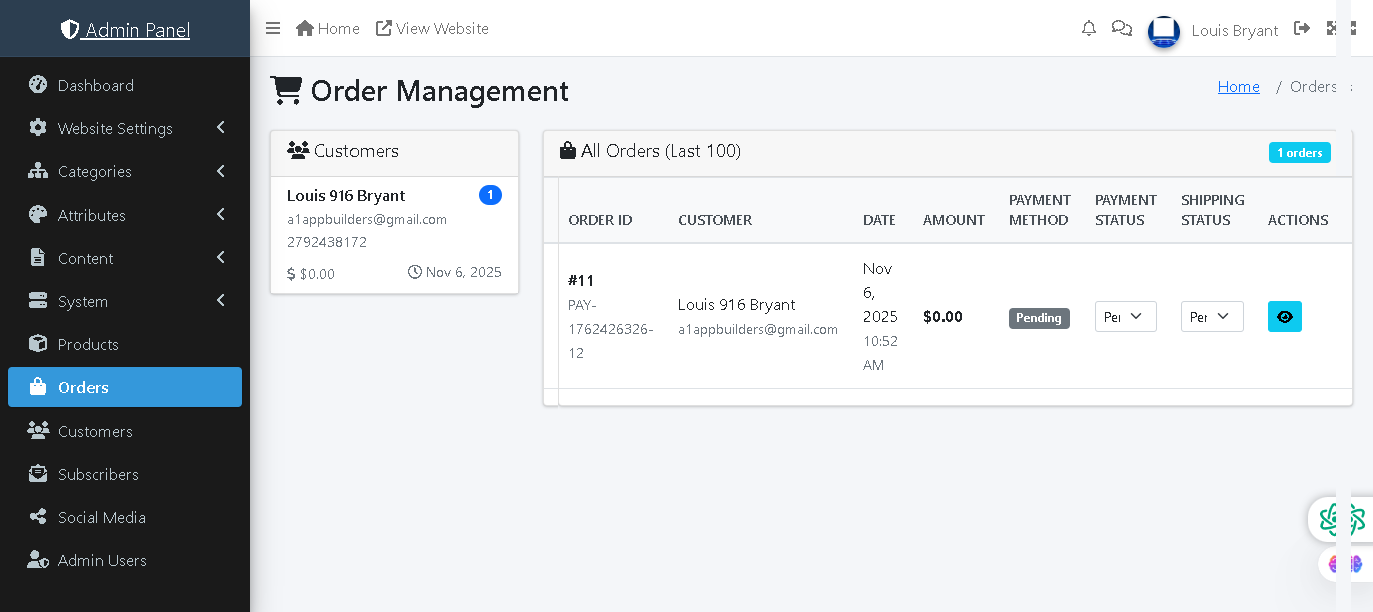
This admin panel page allows administrators to view, monitor, and manage all customer orders. It displays order details including customer information, order amounts, payment and shipping status, and provides quick access to view full order details. Administrators can track orders from placement through fulfillment.
🔍 How It Works
- Customers Sidebar: Displays a quick-access list of customers with their recent activity, total spent, and order count.
- Customer Card: Shows customer name, email address, phone number, total amount spent, and last order date.
- Order Count Badge: Blue notification badge indicates the number of orders placed by each customer.
- All Orders (Last 100): Main table displays the 100 most recent orders with comprehensive details.
- Order ID: Unique identifier and payment transaction ID for tracking and reference.
- Customer: Customer name and email address linked to the order.
- Date: Order placement date and time stamp.
- Amount: Total order value including products and shipping.
- Payment Method: Indicates payment gateway used (PayPal, Stripe, Square).
- Payment Status: Shows payment state (Pending, Completed, Failed, Refunded).
- Shipping Status: Dropdown to update fulfillment state (Pending, Shipped, Delivered, Cancelled).
- Actions: Blue eye icon button to view full order details and customer information.
- Order Count Badge: Shows total orders in the system (e.g., "1 orders").
📊 Current Data
The system shows 1 order in the last 100 orders: Order #11 placed by Louis 916 Bryant on Nov 6, 2025 at 10:52 AM for $0.00 with Pending payment status and Pending shipping status.
🛒 Order Workflow
Orders flow from Pending (upon creation) → Payment processing → Shipped (once fulfilled) → Delivered (upon customer receipt). Administrators can update shipping status and track payment confirmations from integrated payment processors.
Policy:
All upgrades are free.
This is a try-before-you-buy product; no refunds are issued after purchase.