A 1 App Builders
👥 Customer Management
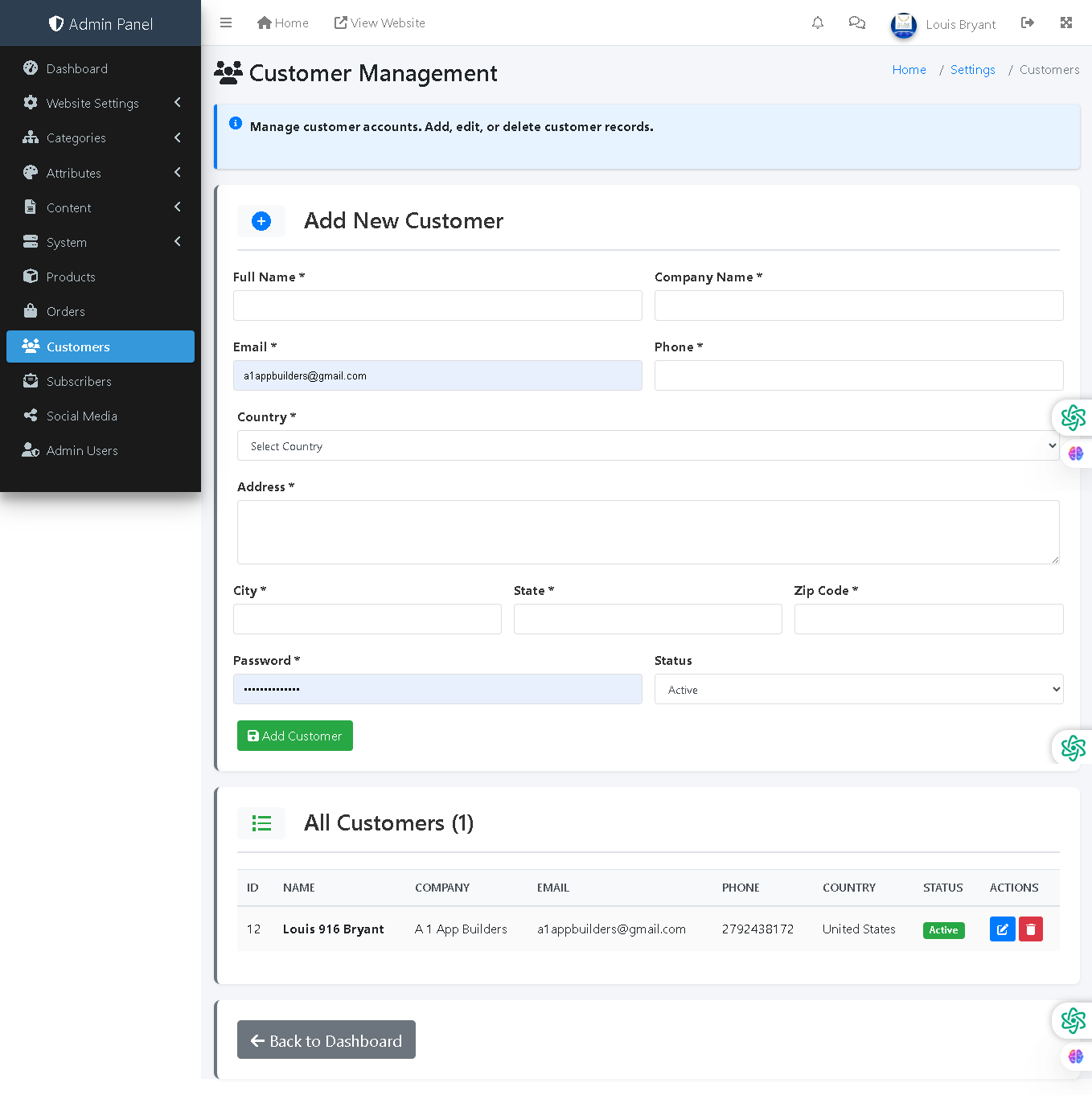
This admin panel page allows administrators to manage customer accounts by adding, editing, and deleting customer records. It captures comprehensive customer information including contact details, address, company affiliation, and account status, enabling administrators to maintain accurate customer databases and support personalized service.
🔍 How It Works
- Add New Customer: Create a customer record by filling in all required and optional information fields.
- Full Name: Customer's complete name as it appears on orders and account.
- Company Name: Business or organization name (optional, for B2B customers).
- Email: Primary email address used for order confirmations and customer communications.
- Phone: Contact phone number for customer service and order updates.
- Country: Select customer's country from dropdown for accurate shipping and tax calculations.
- Address: Full street address for shipping and billing purposes.
- City: City of residence or business location.
- State: State or province for regional organization.
- Zip Code: Postal code for address verification and shipping accuracy.
- Password: Set customer account password for login access to their account portal.
- Status Dropdown: Set account status (Active, Inactive, Suspended) to control account access.
- Add Customer Button: Commits new customer record to the database.
- All Customers Table: Displays all registered customers with ID, name, company, email, phone, country, and status.
- Edit Button: Modify any existing customer's information.
- Delete Button: Remove customer records from the system.
📊 Current Data
The system currently has 1 registered customer: Louis 916 Bryant from A 1 App Builders, United States, with email a1appbuilders@gmail.com, phone 2792438172, and Active status.
🛍️ Customer Integration
Customer records are linked to orders, enabling order history tracking, personalized recommendations, and targeted marketing campaigns. Account status controls customer login access and purchase ability on the front-end store.
Policy:
All upgrades are free.
This is a try-before-you-buy product; no refunds are issued after purchase.