A 1 App Builders
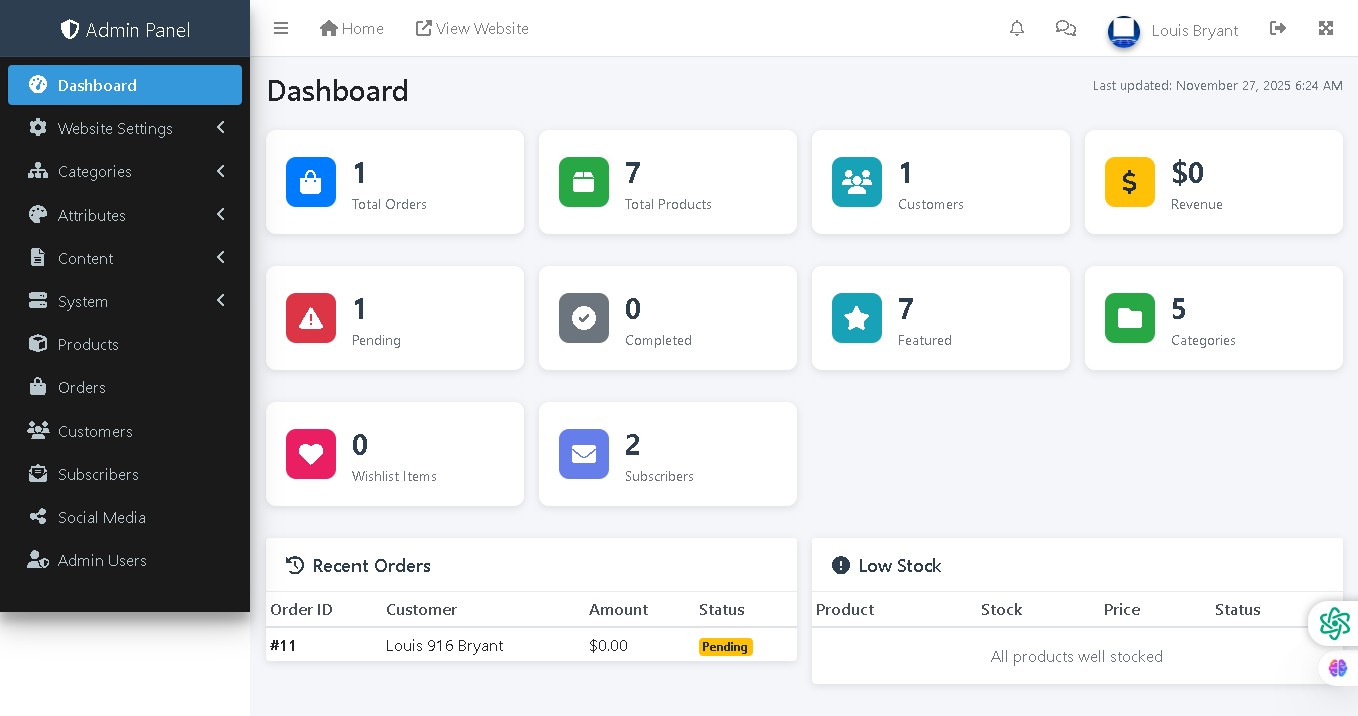
Welcome to the A1 App Builders Admin Dashboard—a comprehensive management control panel that provides administrators with real-time business intelligence, operational metrics, and quick access to critical platform functions. This dashboard serves as the command center for managing products, orders, customers, and platform operations.
The layout features a left sidebar navigation menu, main content area with key performance indicator cards, recent order tracking, and inventory status monitoring—all designed for efficient platform oversight and decision-making.
🌟 Key Features:
- Header Bar: Top navigation includes:
- Admin Panel branding on the left
- Menu icon, Home link, and "View Website" link for storefront access
- Notification bell for alerts and updates
- Messages icon for communication
- User profile "Louis Bryant" displaying logged-in administrator
- Settings icon and additional menu options
- Left Sidebar Navigation: A dark navy menu with expandable sections providing access to:
- Dashboard: Active menu item highlighted in blue leading to this overview page
- Website Settings: Expandable menu with arrow for platform configuration
- Categories: Product category management with expansion option
- Attributes: Product attribute configuration
- Content: Page and content management
- System: System-level settings and configuration
- Products: Product inventory management
- Orders: Order processing and fulfillment
- Customers: Customer management and profiles
- Subscribers: Email subscriber list management
- Social Media: Social media integration settings
- Admin Users: Staff account and permission management
- Main Content Area: Dashboard heading with timestamp "Last updated: November 27, 2025 6:24 AM" showing current data status.
- Key Performance Indicator Cards: A grid of color-coded metric cards displaying:
- Total Orders: Blue card showing "1" with shopping bag icon
- Total Products: Green card displaying "7" with product package icon
- Customers: Teal card showing "1" with people icon
- Revenue: Yellow card displaying "$0" with dollar sign icon
- Pending: Red card showing "1" pending item with warning icon
- Completed: Gray card displaying "0" completed transactions with checkmark icon
- Featured: Teal card showing "7" featured items with star icon
- Categories: Green card displaying "5" product categories with folder icon
- Wishlist Items: Pink/magenta card showing "0" saved items with heart icon
- Subscribers: Purple card displaying "2" email subscribers with envelope icon
- Recent Orders Section: A table displaying latest transactions with columns:
- Order ID: "#11" reference number
- Customer: "Louis 916 Bryant" name
- Amount: "$0.00" order value
- Status: Yellow "Pending" badge indicating order awaiting processing
- Low Stock Section: Inventory monitoring display showing:
- Column headers: Product, Stock, Price, Status
- Status message: "All products well stocked" indicating healthy inventory levels
- Visual Design: Dark navy sidebar, white main content area, color-coded metric cards (blue, green, teal, yellow, red, purple), and status badges create visual hierarchy and enable quick data scanning.
- Color-Coded Icons: Each metric card features distinct colored icons enabling instant recognition of metric type without reading labels.
💡 Why It Works
This admin dashboard maximizes operational efficiency through data-at-a-glance design principles that surface critical metrics without requiring deep navigation. The color-coded metric cards enable instant visual scanning—green signals healthy inventory, red indicates pending issues, yellow shows revenue tracking. The left sidebar provides comprehensive menu access organized by function (Products, Orders, Customers) enabling single-click navigation to management areas. The Recent Orders section tracks latest transactions in real-time, allowing administrators to respond quickly to new business activity. The Low Stock indicator proactively alerts administrators to inventory concerns before they become customer-facing issues. The timestamp "Last updated: November 27, 2025 6:24 AM" provides data freshness confidence. The expandable menu items maintain clean navigation while providing organization structure. This combination of real-time metrics, organized navigation, and proactive alerts creates a dashboard that empowers administrators with the information and tools needed for efficient platform management.
Policy:
All upgrades are free.
This is a try-before-you-buy product; no refunds are issued after purchase.