A 1 App Builders
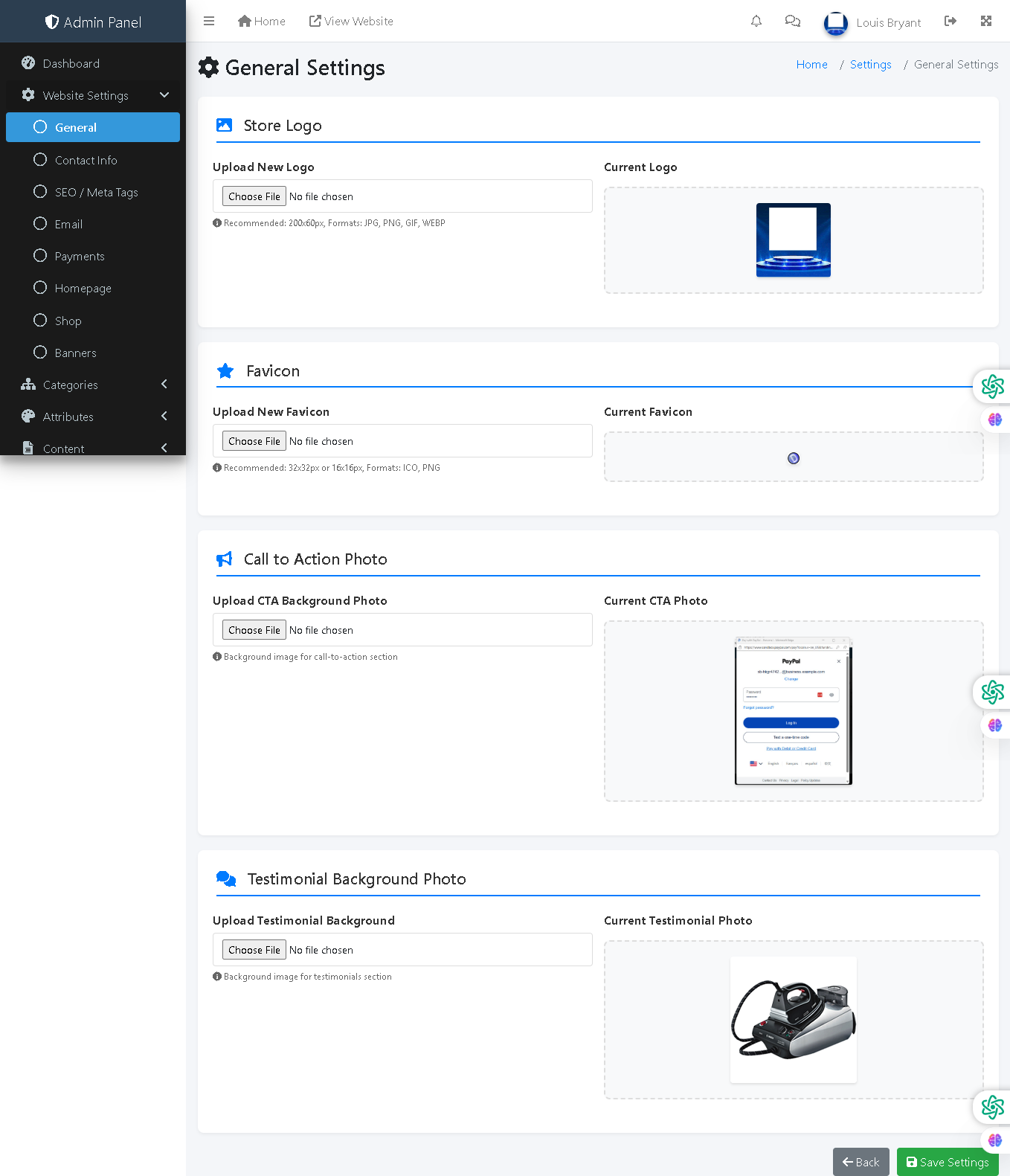
Welcome to the A1 App Builders Admin General Settings Page—a centralized configuration interface where administrators manage core branding assets, visual elements, and presentation components of the e-commerce platform. This page enables customization of logos, favicons, promotional imagery, and testimonial backgrounds that define the platform's visual identity and user interface.
The layout features organized setting sections with file upload capabilities, current asset previews, and form submission controls—designed for intuitive branding and visual asset management.
🌟 Key Features:
- Header Navigation: Top bar includes:
- Admin Panel branding
- Menu icon, Home link, and "View Website" link for storefront preview
- Notification bell, messages, user profile "Louis Bryant"
- Settings and additional menu options
- Left Sidebar Navigation: Expandable Website Settings menu with subsections:
- General: Active highlighted section (current page)
- Contact Info: Business contact details configuration
- SEO / Meta Tags: Search engine optimization settings
- Email: Email configuration and templates
- Payments: Payment processor integration
- Homepage: Homepage layout and content
- Shop: Shop page settings
- Banners: Promotional banner management
- Categories: Product category configuration
- Attributes: Product attribute settings
- Content: Page and content management
- Breadcrumb Navigation: "Home / Settings / General Settings" provides clear location context.
- Page Title: "General Settings" with settings icon indicates main configuration area.
- Store Logo Section: First configuration block featuring:
- Star icon indicating important branding element
- "Upload New Logo" file chooser button showing "No file chosen"
- Recommended specifications: "200x80px, Format: JPG, PNG, GIF, WEBP"
- "Current Logo" preview panel displaying the A1 App Builders navy and blue logo
- Favicon Section: Second configuration block with:
- Star icon for browser tab identification
- "Upload New Favicon" file chooser button with "No file chosen" status
- Recommended specifications: "32x32px or 16x16px, Format: ICO, PNG"
- "Current Favicon" preview showing blue circular icon
- Call to Action Photo Section: Third configuration block enabling:
- Megaphone icon indicating promotional content
- "Upload CTA Background Photo" file chooser
- Description: "Background image for call-to-action section"
- "Current CTA Photo" preview displaying PayPal checkout interface example
- Testimonial Background Photo Section: Fourth configuration block featuring:
- Cloud icon indicating customer feedback area
- "Upload Testimonial Background" file chooser button
- Description: "Background image for testimonials section"
- "Current Testimonial Photo" preview showing a wireless iron/garment tool image
- Form Submission Controls: Bottom action buttons:
- Back Button: Gray button with back arrow for navigation
- Save Settings Button: Green button with checkmark for form submission and configuration persistence
- Visual Design: White content area with blue section headers, file upload buttons, and preview panels. Color-coded icons (star for logo, star for favicon, megaphone for CTA, cloud for testimonials) provide visual organization.
- File Upload Pattern: Each section follows consistent UX: file chooser button, recommended specs, and current asset preview enabling comparison before/after.
💡 Why It Works
This general settings page centralizes critical branding asset management in one accessible location, reducing administrative complexity. The consistent two-column layout (upload on left, current preview on right) enables administrators to visualize changes before saving. Recommended file specifications prevent upload errors and ensure assets render properly across devices. The current asset previews build administrator confidence by showing exactly what customers will see. The organized section structure with icons (star, megaphone, cloud) provides visual hierarchy and quick scanning capability. The "Save Settings" button placement at the bottom prevents accidental updates while making submission visible and intentional. The breadcrumb navigation establishes clear hierarchy within the settings structure. The expandable sidebar menu keeps related configuration options logically grouped while remaining accessible. This combination of clear file specifications, preview capability, organized sections, and straightforward submission creates an efficient interface for managing platform branding and visual identity without requiring technical expertise.
Policy:
All upgrades are free.
This is a try-before-you-buy product; no refunds are issued after purchase.