A 1 App Builders
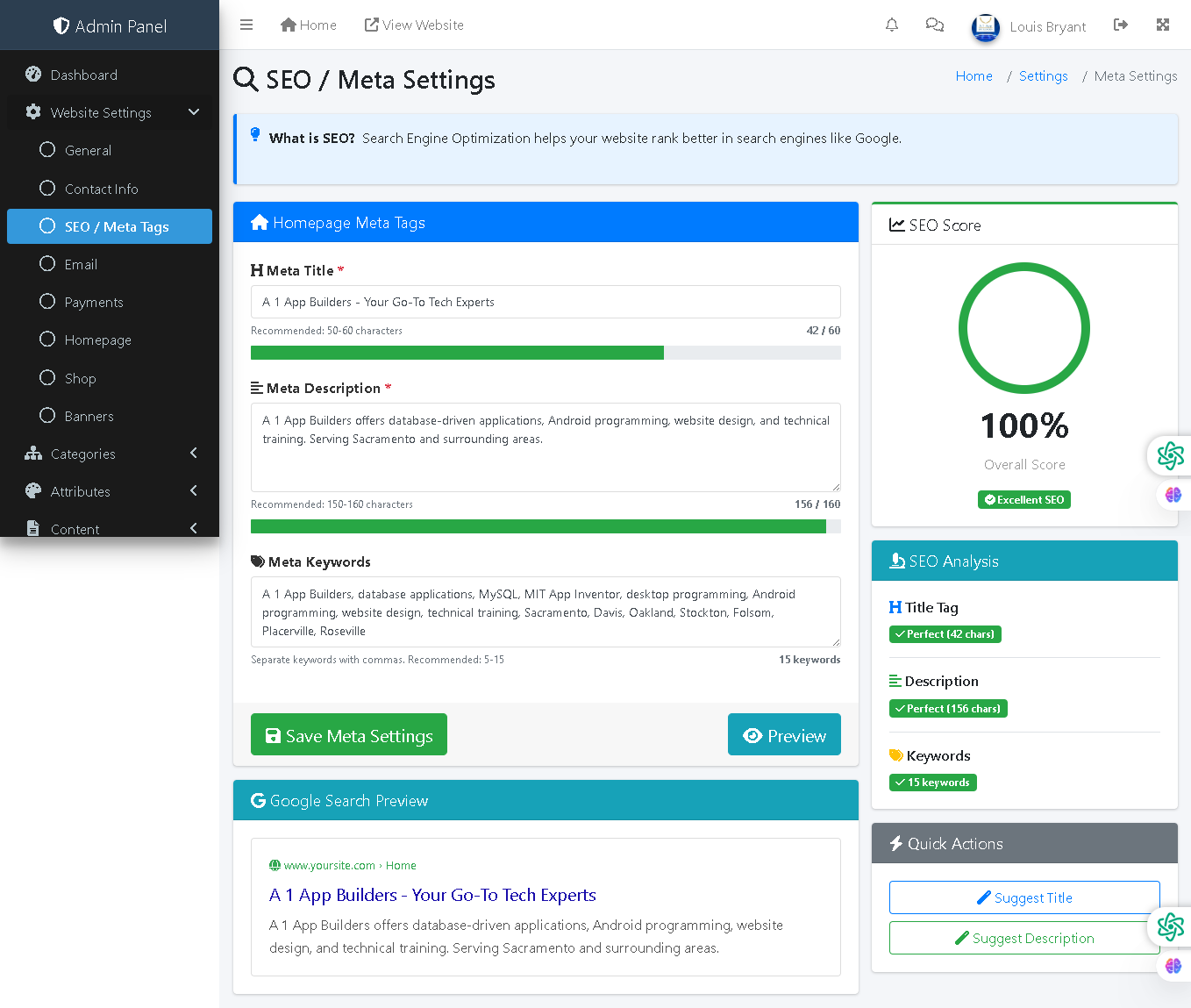
Welcome to the A1 App Builders Admin SEO/Meta Settings Page—a comprehensive search engine optimization configuration interface where administrators manage metadata, keywords, and search performance for the website homepage. This page enables SEO professionals and content managers to optimize search visibility through title tags, meta descriptions, keyword strategy, and real-time SEO performance scoring.
The layout features an informational header, meta tag input sections with character counters, real-time SEO scoring on the right panel, Google Search preview, and quick-action suggestion tools for optimizing search performance.
🌟 Key Features:
- Header Navigation: Top bar includes:
- Admin Panel branding and menu icon
- Home link and "View Website" for storefront preview
- Notifications, messages, user profile "Louis Bryant"
- Left Sidebar Navigation: Website Settings submenu with "SEO / Meta Tags" highlighted as active section.
- Breadcrumb Navigation: "Home / Settings / Meta Settings" provides clear location context.
- Page Title: "SEO / Meta Settings" with magnifying glass icon.
- Information Banner: Blue information box explaining: "What is SEO? Search Engine Optimization helps your website rank better in search engines like Google."
- Homepage Meta Tags Section: Blue-header form area for optimizing homepage search results with:
- Meta Title Field: Required text input displaying:
- Value: "A 1 App Builders - Your Go-To Tech Experts"
- Red asterisk marking as required
- Helper text: "Recommended: 50-60 characters"
- Character counter: "42 / 60" with green progress bar showing 70% utilization
- Meta Description Field: Required text area showing:
- Value: "A1 App Builders offers database-driven applications, Android programming, website design, and technical training. Serving Sacramento and surrounding areas."
- Red asterisk marking as required
- Helper text: "Recommended: 150-160 characters"
- Character counter: "156 / 160" with green progress bar showing 97% utilization
- Meta Keywords Field: Text area containing:
- Value: "A1 App Builders, database applications, MySQL, MIT App Inventor, desktop programming, Android programming, website design, technical training, Sacramento, Davis, Oakland, Stockton, Folsom, Placerville, Roseville"
- Helper text: "Separate keywords with commas. Recommended: 5-15"
- Keyword counter: "15 keywords"
- Meta Title Field: Required text input displaying:
- Form Action Buttons: Two buttons below the form:
- Save Meta Settings Button: Green button with folder icon for form submission
- Preview Button: Teal button with eye icon for viewing search appearance
- Google Search Preview Section: Teal-header section displaying:
- Simulated Google search result showing:
- URL: "www.yoursite.com › Home"
- Title (blue): "A 1 App Builders - Your Go-To Tech Experts"
- Description (black): "A1 App Builders offers database-driven applications, Android programming, website design, and technical training. Serving Sacramento and surrounding areas."
- Demonstrates how metadata appears in search results
- Simulated Google search result showing:
- Right Panel - SEO Score Section: Green-header panel featuring:
- "SEO Score" heading with link icon
- Large circular progress indicator showing "100%" with green fill
- "Overall Score" label below percentage
- Green "Excellent SEO" badge indicating top-tier optimization
- SEO Analysis Section: Teal-header panel displaying detailed optimization breakdown:
- Title tag: "Perfect (42 chars)" with green checkmark
- Description: "Perfect (156 chars)" with green checkmark
- Keywords: "15 keywords" with green checkmark
- Quick Actions Section: Gray-header panel with two suggestion buttons:
- Suggest Title Button: Blue-bordered button with pencil icon
- Suggest Description Button: Green-bordered button with checkmark icon
- Visual Design: Color-coded sections (blue for meta tags, teal for preview/analysis, green for scoring), green progress bars, checkmarks for completed fields, and AI-powered suggestion buttons create visual organization and encourage optimization.
💡 Why It Works
This SEO settings page democratizes search engine optimization by making it accessible to non-technical administrators through clear guidance and real-time feedback. The character counters with progress bars immediately show administrators whether they're within recommended lengths for title (50-60) and description (150-160) tags—standards that maximize search result display without truncation. The 100% "Excellent SEO" score badge with green checkmarks provides motivational feedback and confidence that the homepage is optimized properly. The Google Search Preview section demonstrates exactly how the website appears in search results, enabling administrators to verify metadata quality without launching separate SEO tools. The informational banner at the top educates administrators about SEO value, increasing engagement with the settings. The green checkmarks and "Perfect" labels on the analysis panel build confidence that individual elements meet optimization standards. The "Suggest Title" and "Suggest Description" buttons provide AI-powered assistance for administrators uncertain about optimization best practices. The teal Google Search Preview section bridges the gap between backend configuration and frontend search result appearance. This combination of character guidance, real-time scoring, visual feedback, search preview, and AI suggestions transforms SEO optimization from a mysterious technical task into an intuitive, confidence-building process that encourages proper search engine optimization.
Policy:
All upgrades are free.
This is a try-before-you-buy product; no refunds are issued after purchase.